Bring minds together. Move work forward.

Your people.
Your AI agents.
One conversation.

CrewParley Chat brings conversations, AI-agent collaboration and work coordination together. Stay connected through supported clients while an authorized work computer handles the agent workflows it supports.

Access is by request. Windows, macOS, Android, iOS: in development. No public installers or store listings are approved. Check platform details

People and agents.
A shared direction.
01

Connect

Human conversations and contacts.

02

Collaborate

Clearly identified agents and AI teams.

03

Coordinate

Supported work, with permission and review.

Product direction · Check access before planning a workflow.

A clearer thread through the work

People to talk with.
Agents to work with.

Chats brings human conversations and distinct agent or AI-team threads into one navigation. Participation and tools depend on the supported conversation.

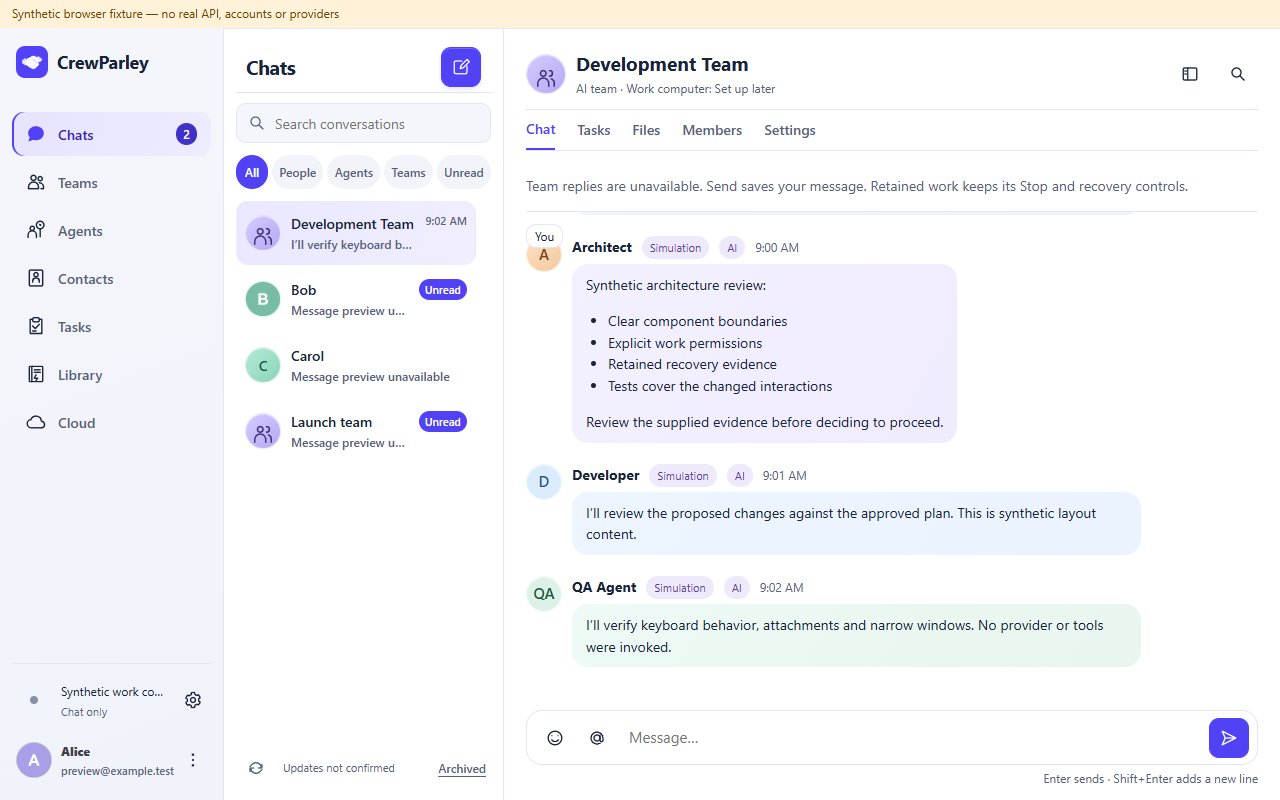
Chats, contacts and clearly identified agentsRenderer demonstration
CrewParley unified desktop renderer with synthetic Bob and Carol contact threads beside a separate AI team conversation. Agent contributions are labelled AI and Simulation; the computer is chat only.
Current desktop renderer with synthetic demonstration content, captured October 11, 2026. Browser fixture; no real account, provider execution or installed-release qualification. Human contacts and the AI team are separate threads. View full screenshot
In development

Chat with people

The unified experience brings contacts and human conversations into Chats.

Supported signed-in account access and an authorized conversation.

Access and client qualification must be confirmed. AI tools are not a prerequisite for human messaging.

In development

Work with AI agents

Agents and AI teams bring defined roles, shared context and review to your work.

Supported agent setup, workflow permissions and human review.

An AI persona is not a human professional. Participant combinations depend on the supported conversation.

Calls, with clear boundaries

A voice in
the conversation.

App-to-app voice has separate human, AI and agent-initiated availability. Two-person human audio is distinct from AI voice processing.

Understand Calls and availability
In development

Call another person

App-to-app voice is designed for two authorized human participants.

An approved Calls-enabled build, accepted contact and fresh service authorization.

Real-device audio and release approval remain pending. Human calls do not require AI-provider tools. Group call actions select one recipient.

Connected clients. Explicit work permissions.

Your conversation travels.
Work needs an eligible host.

A supported companion can access authorized conversations. Agent requests need an eligible, authorized, online work computer in a supported execution state. Signing in on a phone does not grant desktop file or command access.

In development

Stay connected from a companion

Supported companion clients are intended to access authorized conversations and request supported work.

Qualified client, signed-in access and an eligible authorized online work computer for agent requests.

Installed cross-device acceptance is pending. Phone sign-in does not grant desktop file or command access.

In development

Run work on an authorized computer

An eligible work computer handles the agent workflows it supports.

Explicit host enablement, enrollment, supported authenticated provider and an online eligible session.

Starting an agent, hosting, tool use and unattended scheduling are separate. A private supplied-context draft grants no files, shell, browser, connectors or Office tools.

Choose your getting-started path

Platforms and access

Check the device.
Check the supported workflow.

In development

Windows x64

Windows preview builds are under review. Ask about an authorized evaluation.

Before access
An approved compatible build and individually confirmed access.
Limits
No public installer is approved. Agent hosting and Calls have separate requirements.
View access for Windows x64
In development

macOS · Apple Silicon

A Mac client is being developed; no public distribution is approved.

Before access
A qualified signed and notarized build.
Limits
Client sign-in, installed use and Calls still need qualification. Mac agent hosting is unavailable.
View access for macOS · Apple Silicon
In development

macOS · Intel

Intel Mac support is being developed and remains unqualified.

Before access
An independently qualified Intel build.
Limits
Apple Silicon build evidence does not qualify Intel or its supported OS range. Mac agent hosting is unavailable.
View access for macOS · Intel
In development

Android

A companion client is being developed. No Google Play listing is approved.

Before access
A qualified native client and authorized account access.
Limits
Physical-device workflows and incoming-call behavior remain unqualified. Phones do not host desktop agents.
View access for Android
In development

iPhone · iOS

An iPhone companion is being developed. No App Store listing is approved.

Before access
A qualified signed native client and authorized account access.
Limits
Native build and physical-device workflows remain unqualified. Phones do not host desktop agents.
View access for iPhone · iOS

Trust starts with understanding

Know what you share.
Know what you authorize.

Participants, the work computer and AI services see different parts of a workflow. Local orchestration can still send context to a provider. Human Calls and AI voice have different processing paths.

Permissions belong to the app and each service. Signing in, choosing a role or reading a policy does not authorize a microphone or a connector.

Explore data and choices

Useful answers

Before you
get started.

Do I need AI-provider tools just to chat with people?

No. Human messaging and human Calls do not require AI-provider tools or an AI trial. Running agents on a work computer requires the supported provider setup for that workflow. Companion access and AI calling have their own availability and service requirements.

Do I need a CrewParley account?

Hosted human conversations and companion access require supported signed-in account authorization. Legitimate supported local workflows can remain accountless. Cloud manages account and services; it is not another chat product.

What happens when the work computer is offline?

An offline, paused, revoked or otherwise ineligible computer cannot execute the request. Selecting a computer or sending a message does not enable hosting. Check the displayed state and supported recovery; do not assume automatic failover or repeat work with an unknown outcome.

Which platforms can I access today?

Access is by request. Windows, macOS, Android, iOS: in development. No public installers or store listings are approved.

Are human and AI Calls the same?

No. Human audio is designed for two authorized people and does not use an AI speech worker. AI voice also processes audio and selected context through its voice service and AI provider. Human Calls: In development. AI Calls: In development. App-to-app voice does not establish group conferencing or general telephone service.

Does everything stay on my device?

No. Hosted conversations reach platform services and other authorized participants. Agent context can reach the work computer and selected AI provider. AI voice has additional audio processing. Local orchestration, transport encryption and disabled app recording are not zero-retention or end-to-end privacy guarantees.

Bring minds together. Move work forward.

Your direction.
More perspectives.

Explore human conversations, AI agents and supported work coordination.

Access is by request. Windows, macOS, Android, iOS: in development. No public installers or store listings are approved. Check platform details