The product

One experience. People and agents with a clear purpose.

Bring human conversations, distinct AI-agent threads and work coordination into a unified workspace. Check client access and supported workflows before getting started.

Access is by request. Windows, macOS, Android, iOS: in development. No public installers or store listings are approved. Check platform details

Chats, contacts and clearly identified agentsRenderer demonstration
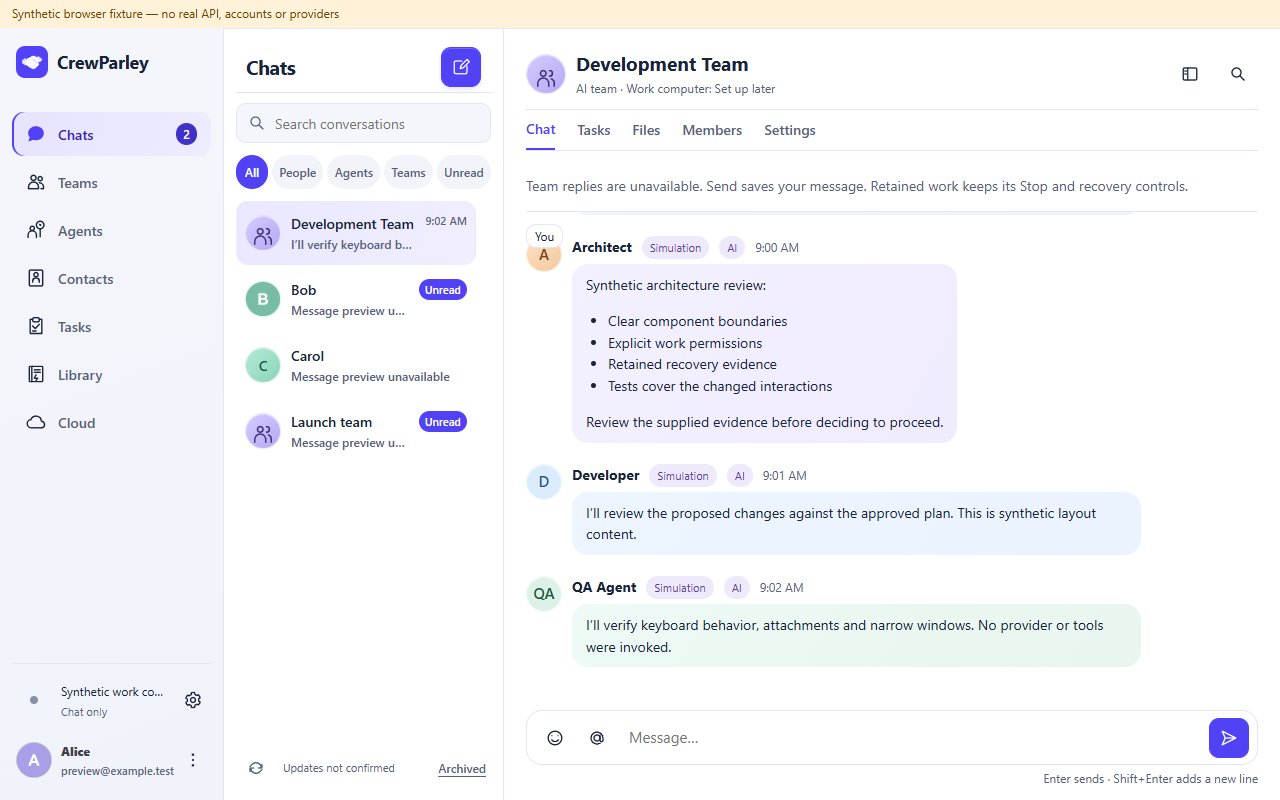
CrewParley unified desktop renderer with synthetic Bob and Carol contact threads beside a separate AI team conversation. Agent contributions are labelled AI and Simulation; the computer is chat only.
Current desktop renderer with synthetic demonstration content, captured October 11, 2026. Browser fixture; no real account, provider execution or installed-release qualification. Human contacts and the AI team are separate threads. View full screenshot

Know who is participating

People, agents
and AI teams.

Human contacts are people you connect with. Human groups have their own participants. Agents have role instructions; AI teams organize agent contributions. These are distinct identities and conversation types.

In development

Chat with people

The unified experience brings contacts and human conversations into Chats.

Supported signed-in account access and an authorized conversation.

Access and client qualification must be confirmed. AI tools are not a prerequisite for human messaging.

In development

Work with AI agents

Agents and AI teams bring defined roles, shared context and review to your work.

Supported agent setup, workflow permissions and human review.

An AI persona is not a human professional. Participant combinations depend on the supported conversation.

Do not assume every human group accepts agents or every private agent thread accepts human contacts. Mixed participation is not advertised as generally available.

Direction, permissions and review

Make the next step explicit.

01

Define the role

Choose supported agents and instructions relevant to the question. A saved profile is not a provider start or tool grant.

02

Share selected context

Provide the facts and constraints you are entitled to share. A private supplied-context draft has no desktop file, shell, browser, connector or Office tools.

03

Request supported work

Select an eligible authorized computer and explicitly request the work. Hosted requests, local project tools and scheduling have different permissions.

04

Review the outcome

Read the response, inspect task activity and verify changes. A saved message, provider completion and accepted task outcome are different events.

Cloud is account and services

One collaboration experience.
Clear account management.

Cloud manages identity, profile, membership, devices and related account services. Chats, Teams, Agents, Contacts, Tasks and Library remain the collaboration navigation; Cloud does not create a second chat or contacts system.

Supported local workflows can remain accountless. Hosted human communication and companion access require supported account authorization.

In development

Run work on an authorized computer

An eligible work computer handles the agent workflows it supports.

Explicit host enablement, enrollment, supported authenticated provider and an online eligible session.

Starting an agent, hosting, tool use and unattended scheduling are separate. A private supplied-context draft grants no files, shell, browser, connectors or Office tools.

In development

Scheduled agent work

Unattended work requires a separately supported and approved workflow.

Explicit scheduling authority and qualified host/execution controls.

Selecting a team or enabling a host does not start a schedule. Public unattended operation is not approved.

Review human and AI Calls separately

Bring minds together. Move work forward.

Your direction.
More perspectives.

Explore human conversations, AI agents and supported work coordination.

Access is by request. Windows, macOS, Android, iOS: in development. No public installers or store listings are approved. Check platform details